在写 Goodbye, TWENTY TWELVE 这篇日志时,我希望针对此日志设计独立于主题的样式,而且日志也涉及到调用 highcharts framework。既然是专门针对某一日志/页面的 CSS/JS,自然不想采取全局添加的方式,这样即耗费资源,也增加了不必要的载入时间。因此,通过 WP 主题的 functions.php 写段小小的 hack 是最优的方法。
思路
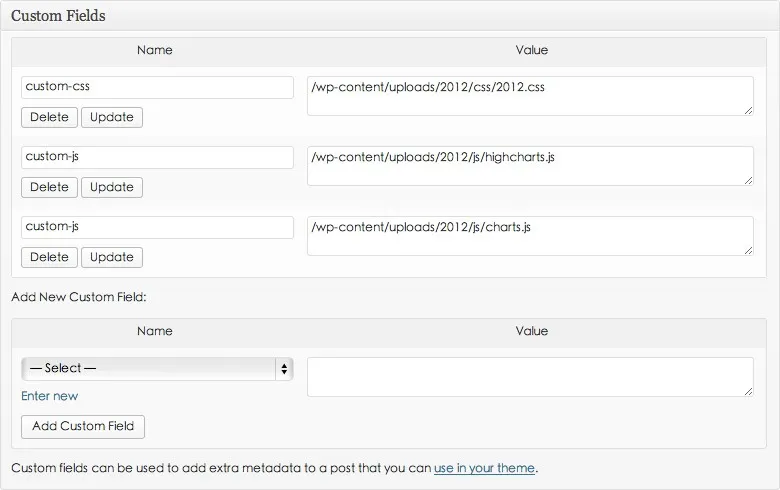
WordPress 内置 Custom Fields 用于添加额外的字段。我设置了 custom-css 和 custom-js 两个 Custom Fields 用于添加独立的 CSS 和 JS 地址。然后通过主题文件下的 functions.php 检查日志是否有独立的 CSS/JS 需要调用。
实现方法
1、添加以下代码段到 functions.php 文件中。
function custom_post_styles() {
	if (!is_single()) return;
	global $post;
	$customCSS = get_post_meta($post->ID, 'custom-css', false);
	if (empty($customCSS)) return;
	$styleNum = 1;
	foreach ($customCSS as $CSS) {
		$styleID = 'post-style' . $styleNum;
		wp_register_style(
			$styleID,
			$CSS,
			false,
			null,
			'all'
		);
		wp_enqueue_style($styleID);
		$styleNum++;
	}
}

function custom_post_scripts() {
	if (!is_single()) return;
	global $post;
	$customJS = get_post_meta($post->ID, 'custom-js', false);
	if (empty($customJS)) return;
	$scriptNum = 1;
	foreach ($customJS as $JS) {
		$scriptID = 'post-script' . $scriptNum;
		wp_enqueue_script(
			$scriptID,
			$JS,
			false,
			null,
			true
		);
		$scriptNum++;
	}
}

add_action('wp_enqueue_scripts', 'custom_post_scripts');
add_action('wp_enqueue_scripts', 'custom_post_styles');
2、然后在日志编辑器下面的 Custom Fields 里新建 custom-css 和 custom-js 两个自定义内容就行了,value 栏里填 CSS/JS 的调用地址,若有多个 CSS/JS 只需格外增加一栏 custom-css 或者 custom-js 就行了。
就这么简单,没了。